Your team uses AI every day. None of it adds up yet.
For team leads whose people each found their own way with ChatGPT, Claude or Gemini. Skillyo lets you share how your best people use AI, so everyone does it the same way, from the AI app they already use, with every result in one place the team can see.
Sound familiar?
AI arrived on your team one person at a time. So did the habits.
- Two people do the same task with AI and hand me two different things.
- Our best prompts live in a shared doc nobody opens, or in one person's chat history.
- I don't see what the team made with AI until it's already been sent.
- New starters take weeks to produce work I'd put my name to.
- When someone leaves, the way they did it leaves with them.
- Some of the team worry AI will replace them, so they don't talk about how they use it.
It's not just your team.
Most teams still use AI one person at a time, with whatever tool each person picked.
of employees have used consumer AI tools at work that their employer didn't approve, and half do it every week.
Microsoft UK and Censuswide, 2,003 employees, October 2025employees say they've been properly trained to use AI at work.
BCG, AI at Work 2025, 10,600+ employees, June 2025Already have prompts, custom GPTs or Gems?
Good. That's the hard part, and you've done it. Bring them in and the whole team can run them, from any app.
A prompt in a shared doc
Works for whoever copies it, and comes out different every time. As a skill it becomes a form, so everyone gets the same result.
A custom GPT or a Gem
Works inside one app, for people with that app. As a skill it runs from ChatGPT, Claude, Gemini, Grok, Notion AI or a browser, for everyone on the team.
A skill in Claude
Helps you. Added to Skillyo with one message, it helps everyone you share it with, and still works in Claude.
OpenAI retires custom GPTs on December 11, 2026. Paste a GPT's instructions into Skillyo and it becomes a skill.
Share how your team does a task, as a form.
The steps, the questions to ask, the files to read and the shape of the answer, written down once. We call it a skill. Anyone on the team fills in the form and gets the finished work back.
- Weekly status update
- Client proposal
- Competitor brief
- Meeting prep
- Email replies in your voice
- Customer recap
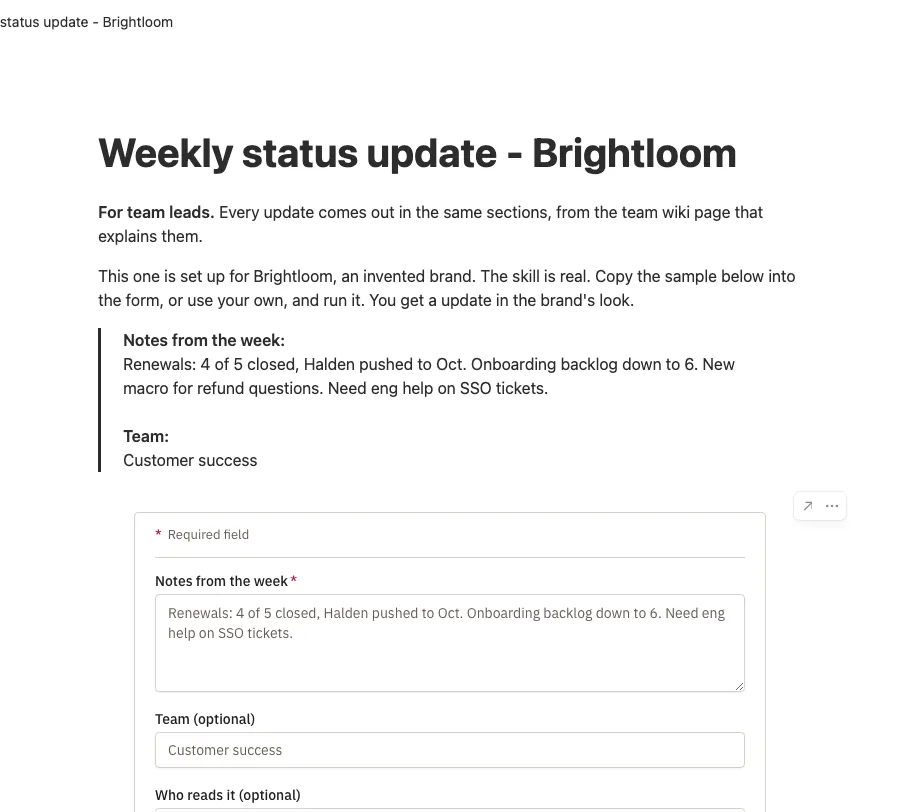
Notes in, the same sections out
Here the team's weekly update: paste the week's notes and get the update in the shape your boss expects, every time.
Run it wherever people already work
In Skillyo, from Claude, ChatGPT, Gemini, Grok or Notion AI, or on the team wiki page, like this one.
Your best person designed the form
So everyone else gets the benefit of their judgment without learning to prompt.
Your best way of working becomes the team's process.
Once it's shared, it's how the team works, not how one person works.
Everyone hands back the same quality
The method runs the same way every time, so you stop rewriting other people's drafts.
New starters do good work in week one
They fill in a form your best person designed, instead of guessing at a prompt.
Everything looks like one company sent it
Your colors, fonts, logo and voice on every result, in Word, PowerPoint, Excel and PDF, with no reformatting before it goes out.
One place where the team's AI work lives.
Every result lands in a shared skillspace with who ran it and when, next to the instructions and files that shaped it. A record of the team's AI work, not a pile of private chats.
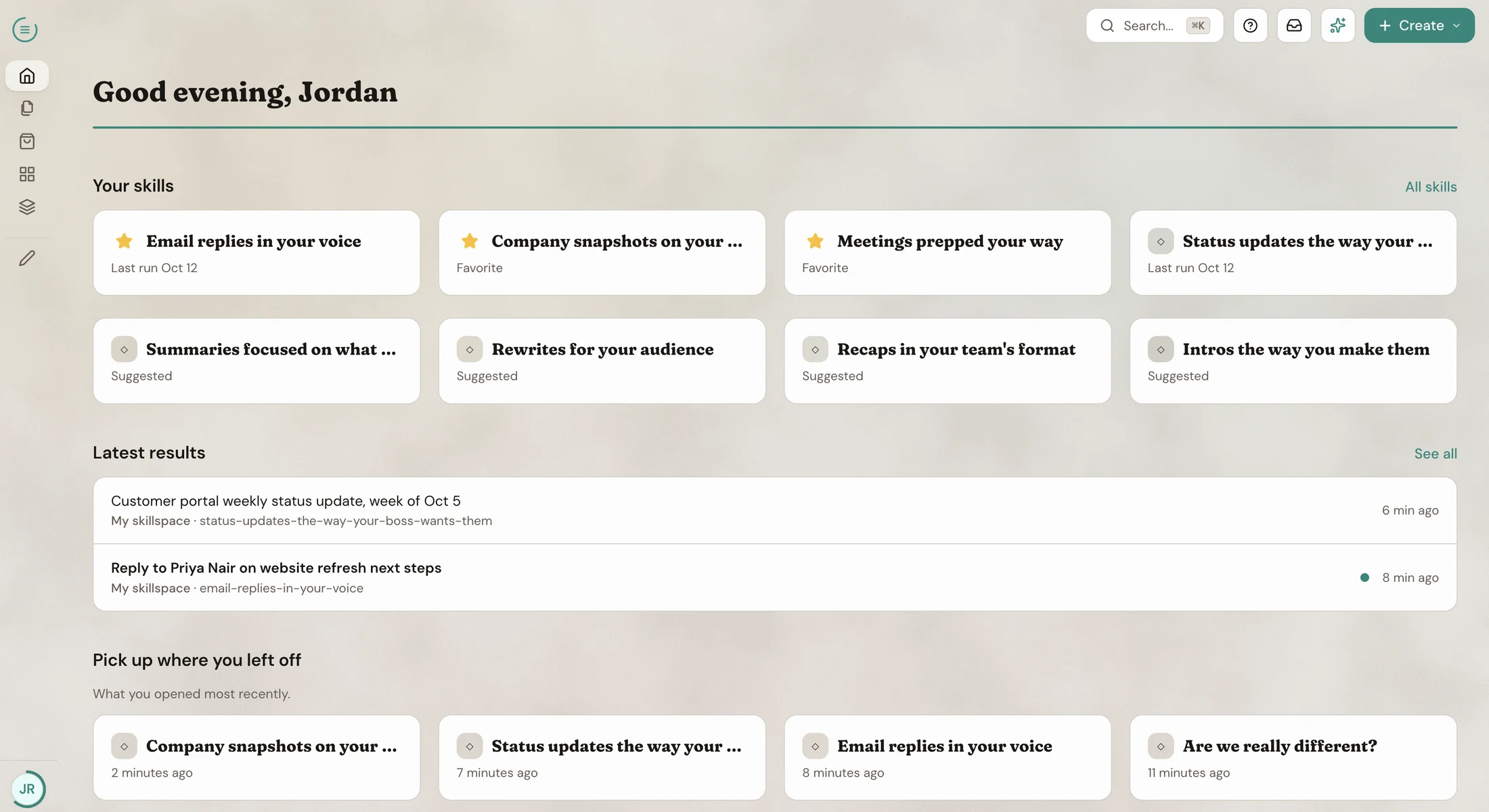
See what the team made this week
Results, comments and messages in one feed, so you review work before it goes out, not after.
The method stays when people leave
Skills, files and results belong to the skillspace, not to whoever made them, and keep running the same way.
Every run reads the files you chose
Attach the brand guide, the price list or the playbook once. Every run uses them, and everyone can see which files those are.
Work on it together, from the apps they already use.
Your team doesn't have to agree on one AI app. Each person runs the same process from Claude, ChatGPT, Gemini, Grok, Notion AI or Skillyo itself, and every result lands in the same skillspace.
Comment on the result, not a screenshot
Feedback sits on the work itself, where the next person sees it.
Pick up where a colleague left off
Open their latest result and build on it, instead of starting the chat again.
Everyone can run it. Not everyone can change it.
You decide who edits the process and who only runs it, so the process stays the one you agreed.
Pay once for the team, with a limit for each person.
On the Team plan, one person pays and everyone's runs draw from the team's monthly credits.
A credit budget for each member
So one heavy week surprises no one. At the budget they pause until the month ends or you raise it.
You choose what AI apps can reach
Turn on the skillspaces your team's AI apps and agents may use. The rest stay out of reach.
Nothing goes out without a yes
Anything an app or agent sends, shares or saves waits for a person to approve it.
Invite people outside the team too
Put a freelancer or a partner in a skillspace and choose whether their use is on your bill or theirs.
Questions we get
We already pay for ChatGPT or Claude for the team.
Keep it. Those give everyone the model. Skillyo gives everyone your method, and it runs from inside those apps, so nobody changes tools.
We already use skills in Claude. Why Skillyo?
Keep using them. Skillyo runs inside Claude, and your Claude skills come in with one message. What Skillyo adds is everyone else: colleagues on other apps, and people with no AI account, run it from a form and get the finished result, with every result in one place your team can see.
Nobody has time to set this up.
Start from a prompt someone already uses. Paste it in and Skillyo turns it into a form with the right fields. Or talk your AI app through how you do the task and it sets it up for you.
Will people actually use it?
They fill in a form, from the app they already have open, and the first result comes back finished.
Will my team feel replaced?
What you share is your team's own know-how, written down so everyone can use it. AI does the drafting. Your people decide what's good, and the people who know the work best are the ones who shape it.
What happens to our work if someone leaves?
Nothing. The process, files and results belong to the team's space, so the next person runs the same process and sees the full history.
What does it cost?
It's free to start. On the Team plan, one person pays for everyone, with a credit budget for each member. See plans
Your team already uses AI. Make it one way of working.
Start with the prompt your team already passes around.